Google is rolling out a significant usability upgrade to Android’s Desktop Mode . The tweak makes the platform’s productivity features much more intuitive when connected to an external display. The latest Android 16 QPR2 update now officially supports Circle to Search functionality, extending one of Android’s most convenient features beyond the phone’s built-in screen.
Circle to Search arrives on external monitors with Android 16 QPR2
For users unfamiliar with the process, Android’s Desktop Mode allows you to connect your phone to a monitor and use it like a traditional computer. This mode supports resizable apps and has a familiar desktop environment. However, until this new update, the highly useful Circle to Search feature—which lets users quickly look up anything on their screen—was unavailable in this multi-display setting. This limitation meant users had to revert to standard search methods when working on a large monitor.
The Android 16 QPR2 update resolves this gap in functionality. Now, users can easily trigger Circle to Search while viewing their phone’s content on an external monitor. This means you can swiftly investigate any piece of text, an unfamiliar image, or even an object in a video playing on your large display (reported by Android Authority ).
Engaging the feature is simple. All you have to do is use your mouse to click and hold the Home button or the App Drawer button on the taskbar of the external screen. Once activated, you can tap, scribble, or draw a circle around the content you want to search. The search results then appear in a dedicated panel on the opposite side of the screen. This provides immediate context without interrupting your workflow.
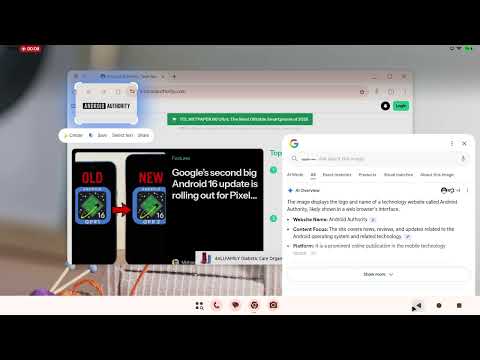
Circle to Search is designed to perform a range of tasks, from identifying items and translating foreign text to giving quick contextual answers. Integrating the feature into Desktop Mode significantly enhances the platform’s utility. This is another move in Google’s quest to make Android a proper desktop OS in the near future.
